Features
Everything Monghoul can do, in detail.
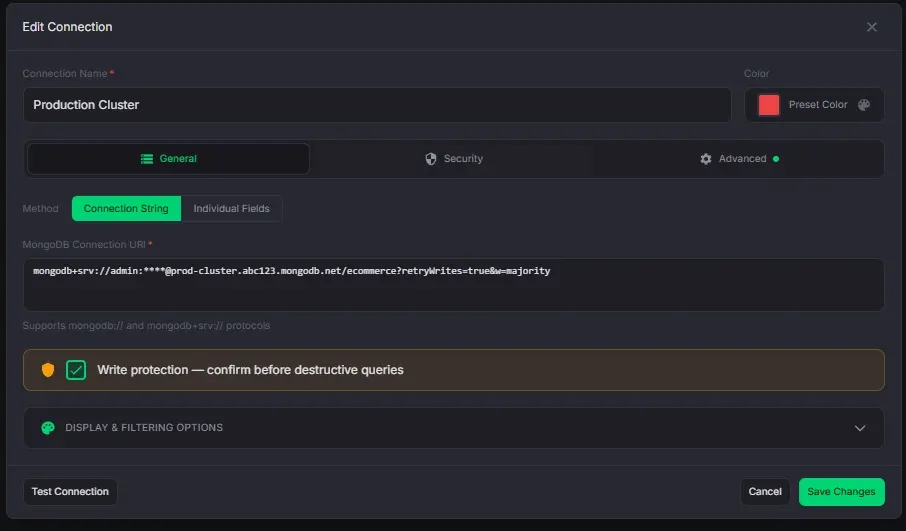
Connection Management
Connect to any MongoDB instance with full protocol support.
- 8 auth methods: SCRAM-SHA-1/256, x509, LDAP, Kerberos, AWS IAM, and no-auth
- SSH tunneling with password or private key authentication
- SSL/TLS with custom CA certificates and client certificates
- Per-connection write protection — detects 25+ destructive operations with database and collection scope
- Database and collection filtering to limit visible namespaces
- Connection health check before saving
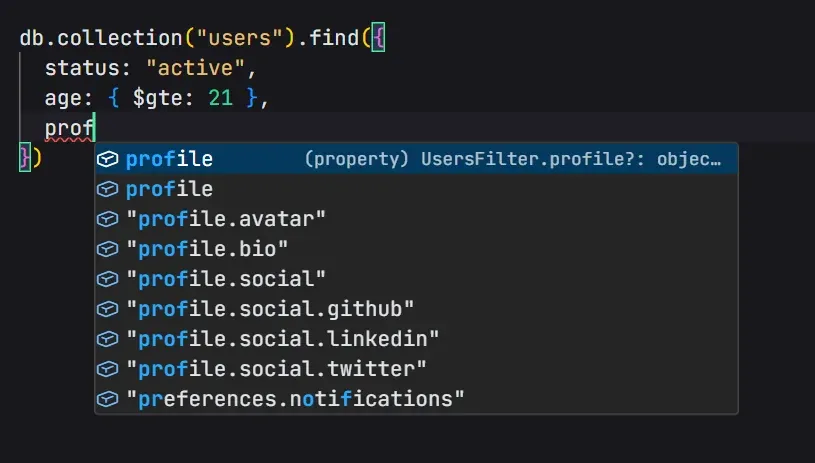
Query Editor
A full Monaco editor with schema-aware autocomplete and a JavaScript sandbox.
- Context-aware completions: field paths, operators, pipeline stages, accumulators, expressions
- Progressive nested field disclosure — type "address." to see child fields only
- Index-aware prioritization in $sort and $match suggestions
- Pipeline-accumulated fields — $addFields and $group output feeds later stages
- JavaScript sandbox with built-in utilities — ObjectId, ISODate, Faker.js (test data), Lodash (data transforms), Luxon & dayjs (dates)
- Enum value suggestions from schema analysis
- Date helper — visual calendar with range mode, quick presets, timezone support, and auto-generated query output
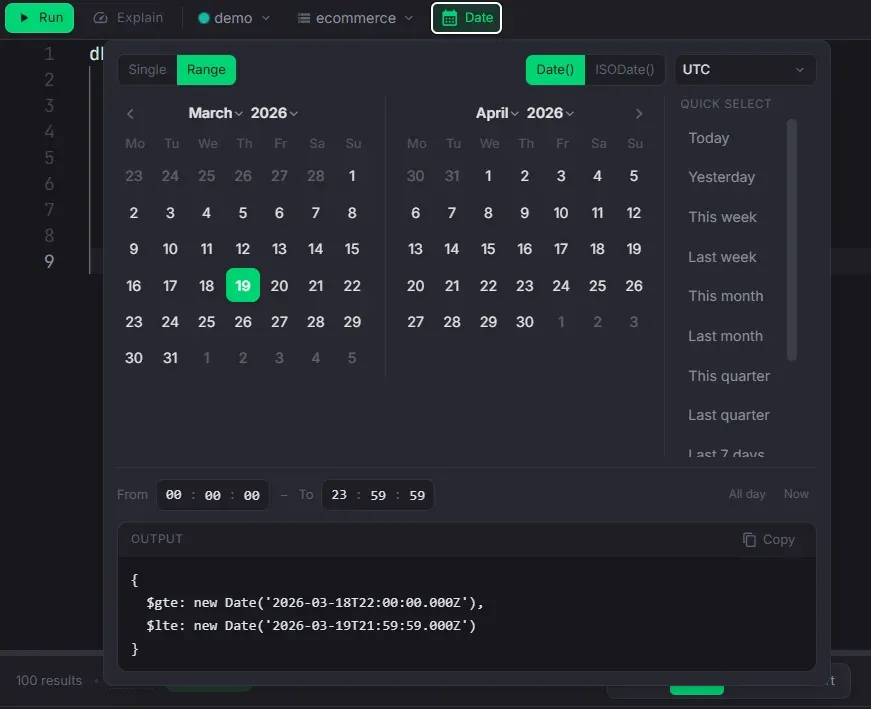
Date Helper
Build date queries visually instead of typing ISODate strings by hand.
- Single date or range mode with independent calendars
- Quick presets: Today, Yesterday, This week, Last month, Last 7 days, and more
- Timezone-aware with a curated timezone selector
- Auto-generates $gte/$lte query filter — copy or insert directly into the editor
- Supports Date() and ISODate() output formats
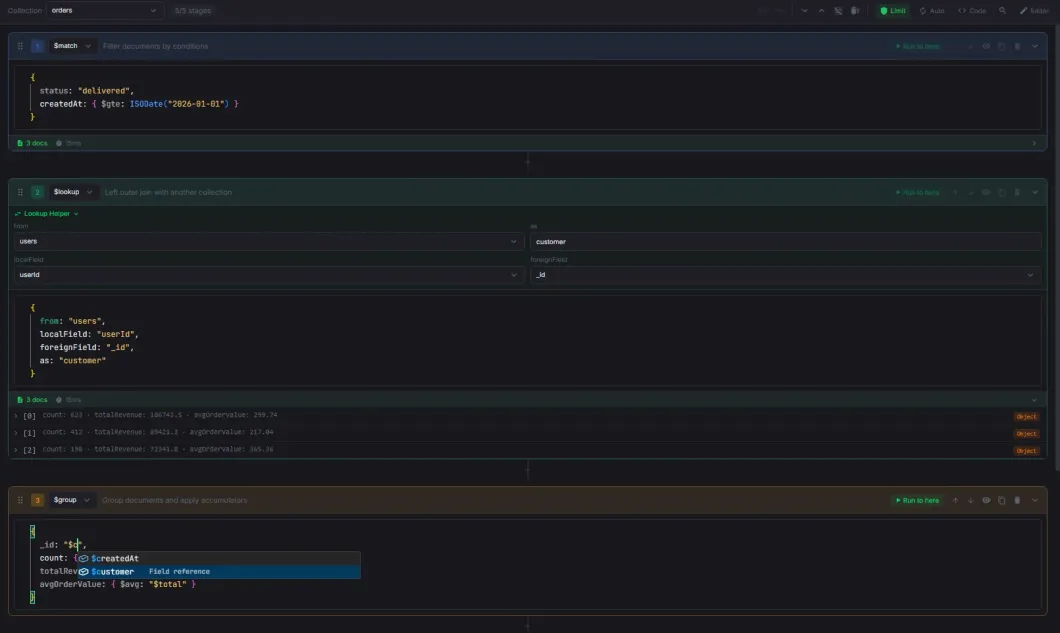
Aggregation Builder
Visual pipeline builder with drag-and-drop, live preview, and code sync.
- All MongoDB aggregation operators with categorized dropdown and server version gating
- Drag-and-drop stage reordering with move up/down buttons
- Per-stage enable/disable, collapse, duplicate, and "Run to here" preview
- $lookup form helper with collection and field dropdowns
- Undo/redo with up to 50 history entries
- Bidirectional code sync — visual builder and raw code stay in sync
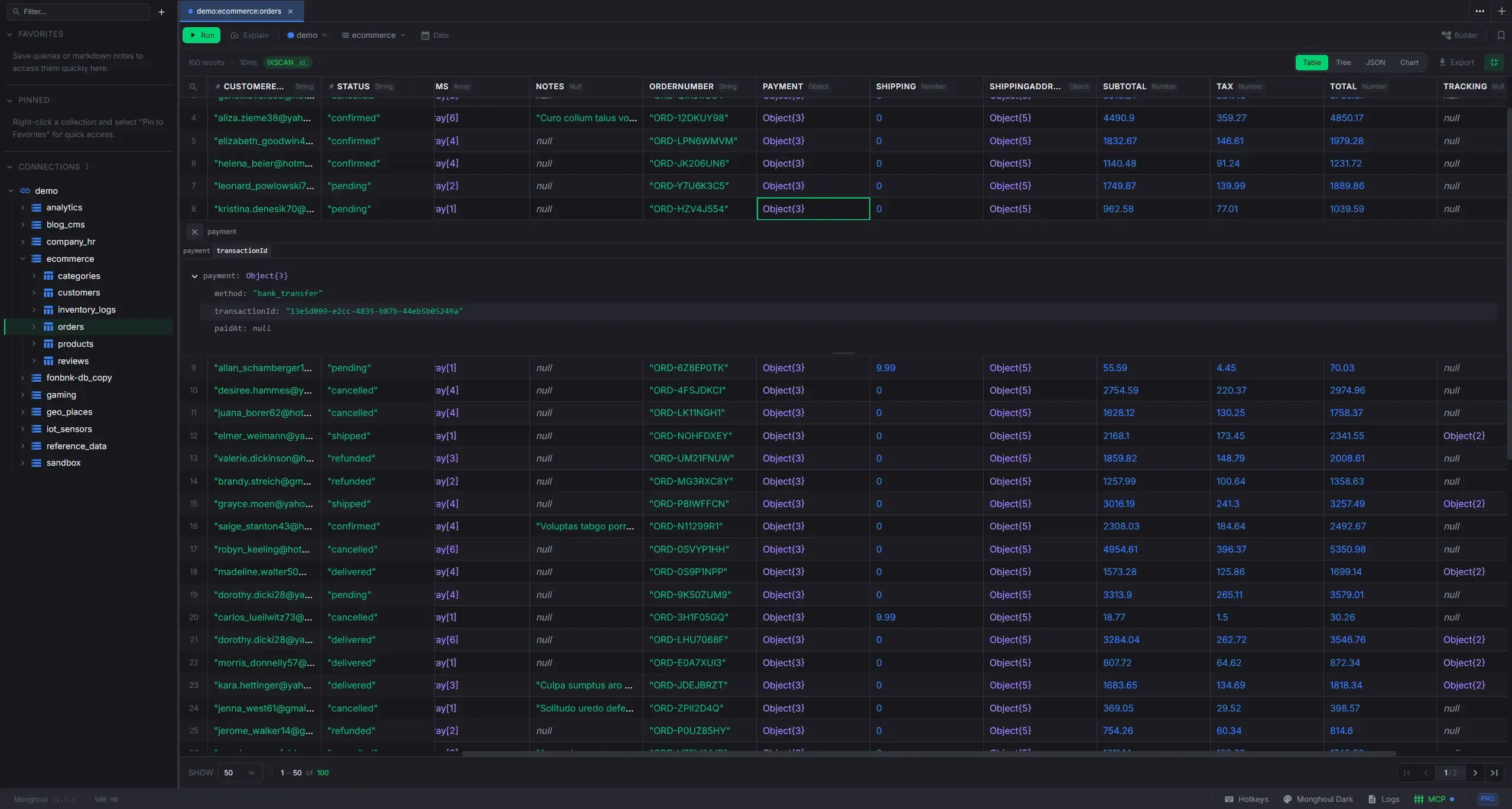
Result Viewer
Six view modes for query results with inline editing and export.
- Table: virtualized spreadsheet with column pinning, sorting, resize, reorder, multi-select, and persistent layout
- Tree: hierarchical document viewer with resizable columns, inline previews, and sticky headers
- Chart: 8 chart types with dual axis, date aggregation, trend lines, and PNG export
- Explain: performance grade, execution plan tree, and smart index suggestions
- Instant cross-page search with cell-level match highlighting
- Configurable default view, collapsible result panel, and fullscreen modes
- Result export to JSON, CSV, and Excel
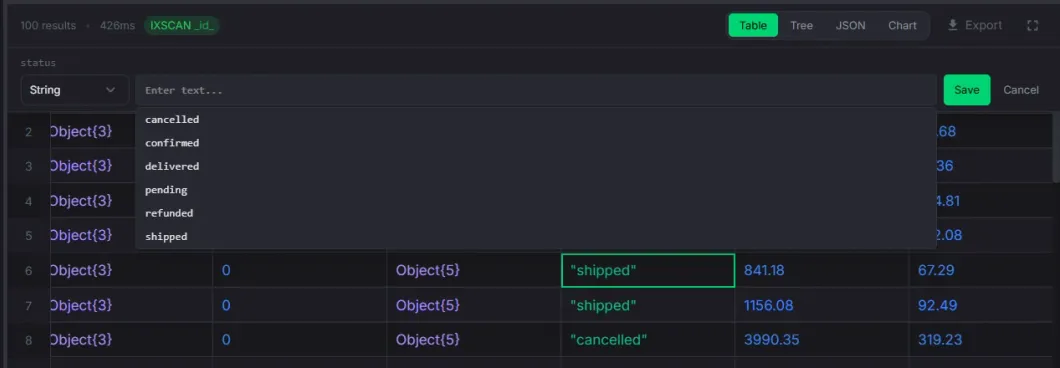
Inline Editing
Edit document values directly in the table or tree view without opening a separate editor.
- Double-click any cell to edit — strings, numbers, booleans, dates, ObjectIds, null
- Type selector dropdown to change the field type with auto-conversion
- Date picker with calendar, time spinners, quick presets, and timezone support
- Enum combobox suggests known values from schema analysis while allowing custom input
- Write protection confirmation on protected connections before saving
- Optimistic updates — edited value appears immediately, rolls back on failure
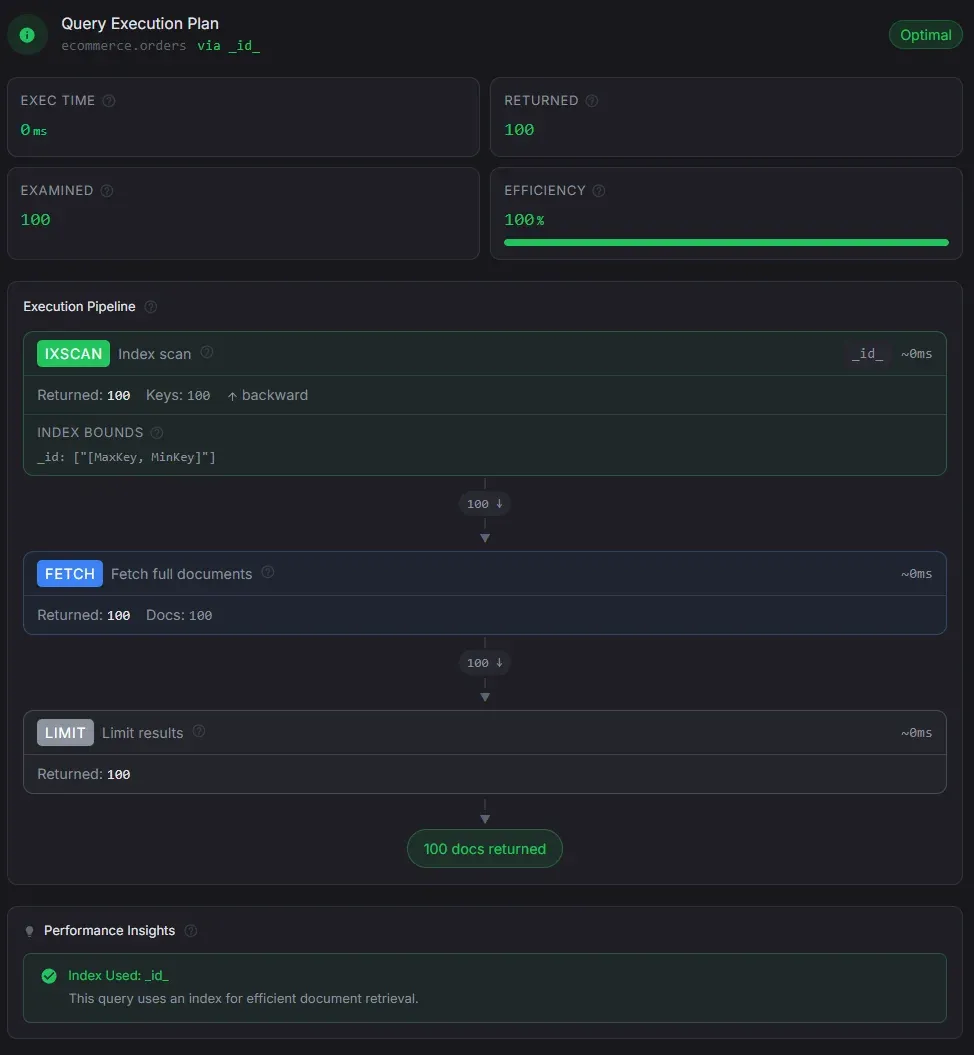
Explain View
Understand query performance at a glance — for both find and aggregation queries.
- Performance grade badge with summary metrics: execution time, docs returned, examined, and scan efficiency
- Full aggregation pipeline visualization with per-stage doc counts, execution times, and structured details
- Data flow funnel showing document counts shrinking through each pipeline stage
- Smart index suggestions following the ESR rule — one click to create the suggested index
- Performance insights: COLLSCAN warnings, disk spills, efficiency analysis, and optimization tips
- Auto-explain runs transparently after every query — no manual step needed
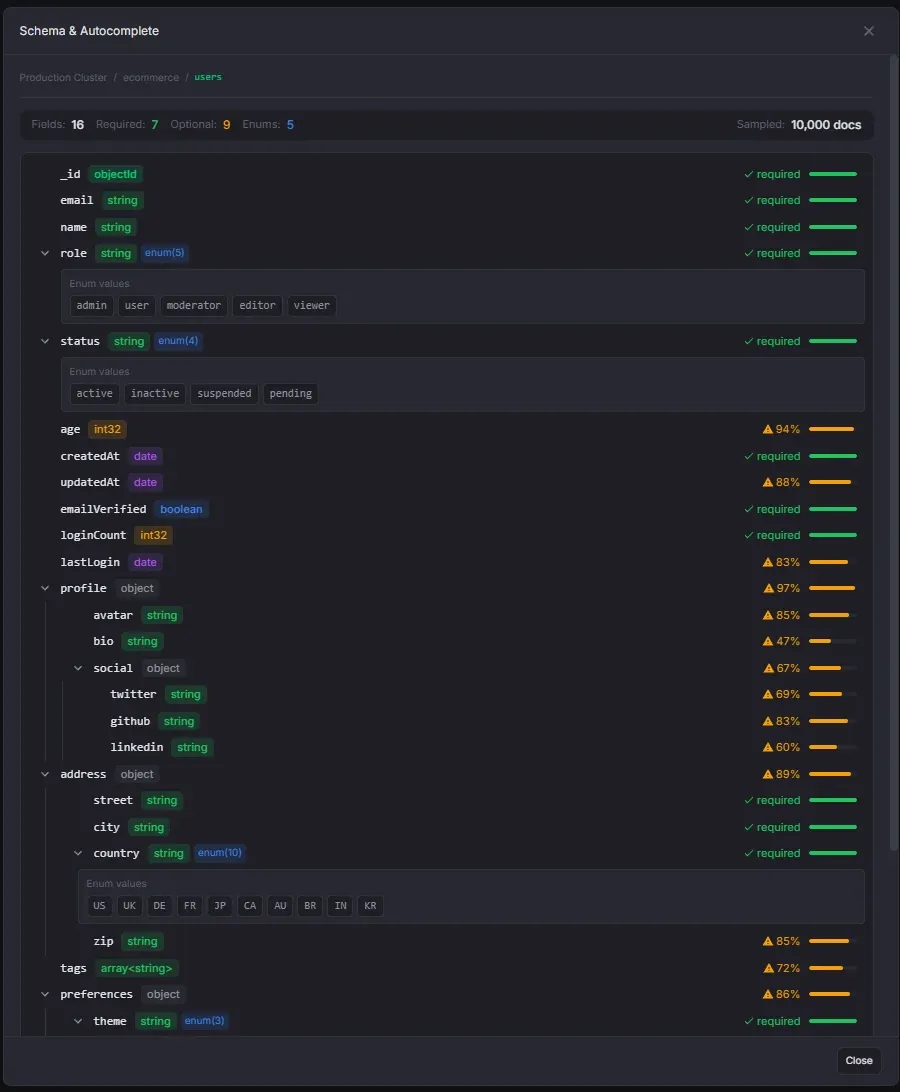
Schema Analysis
Sample-based schema analysis with enum detection and editor integration.
- Configurable sample sizes from 100 to 10,000 documents
- Hierarchical field tree with type badges and occurrence bars
- Automatic enum detection with configurable thresholds
- Manual enum editing — add or remove values directly
- Enum values power autocomplete suggestions in the query editor
- Auto schema generation — opening a tab for a collection without a schema triggers background analysis automatically
- Schema banner — a subtle prompt at the bottom of the editor lets you generate a schema with one click when autocomplete is unavailable
- Results cached and persist across sessions
- Field search — filter the schema tree by field name with auto-expanding parent nodes
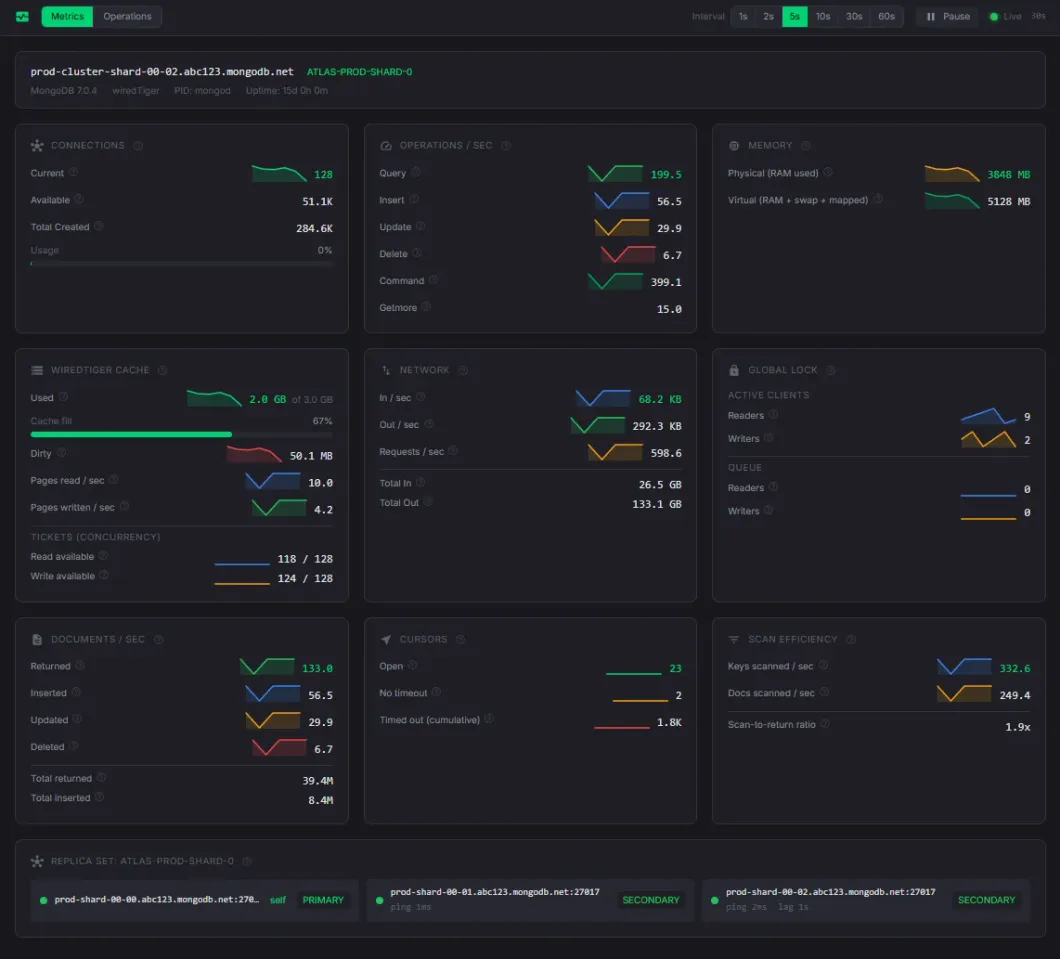
Cluster Monitoring
Real-time server metrics, sparkline charts, slow queries, and database profiler.
- 10 metric cards: connections, ops/sec, memory, WiredTiger cache, network, locks, cursors, replica set
- Sparkline trend charts with hover tooltips (last 30 data points)
- Slow query analysis with duration filters, COLLSCAN badges, and kill operation
- Database profiler with collection ranking and export
- Configurable poll interval from 1s to 60s
Import & Export
Move data in and out of MongoDB in any format.
- Import: JSON, NDJSON, CSV/TSV, Excel with type inference
- Export: JSON (EJSON), CSV, Excel, and MongoDB collection copy
- Write strategies: Insert, Upsert, or Drop & Insert
- Cross-instance collection copy with optional index replication
- Database-level import/export for all collections at once
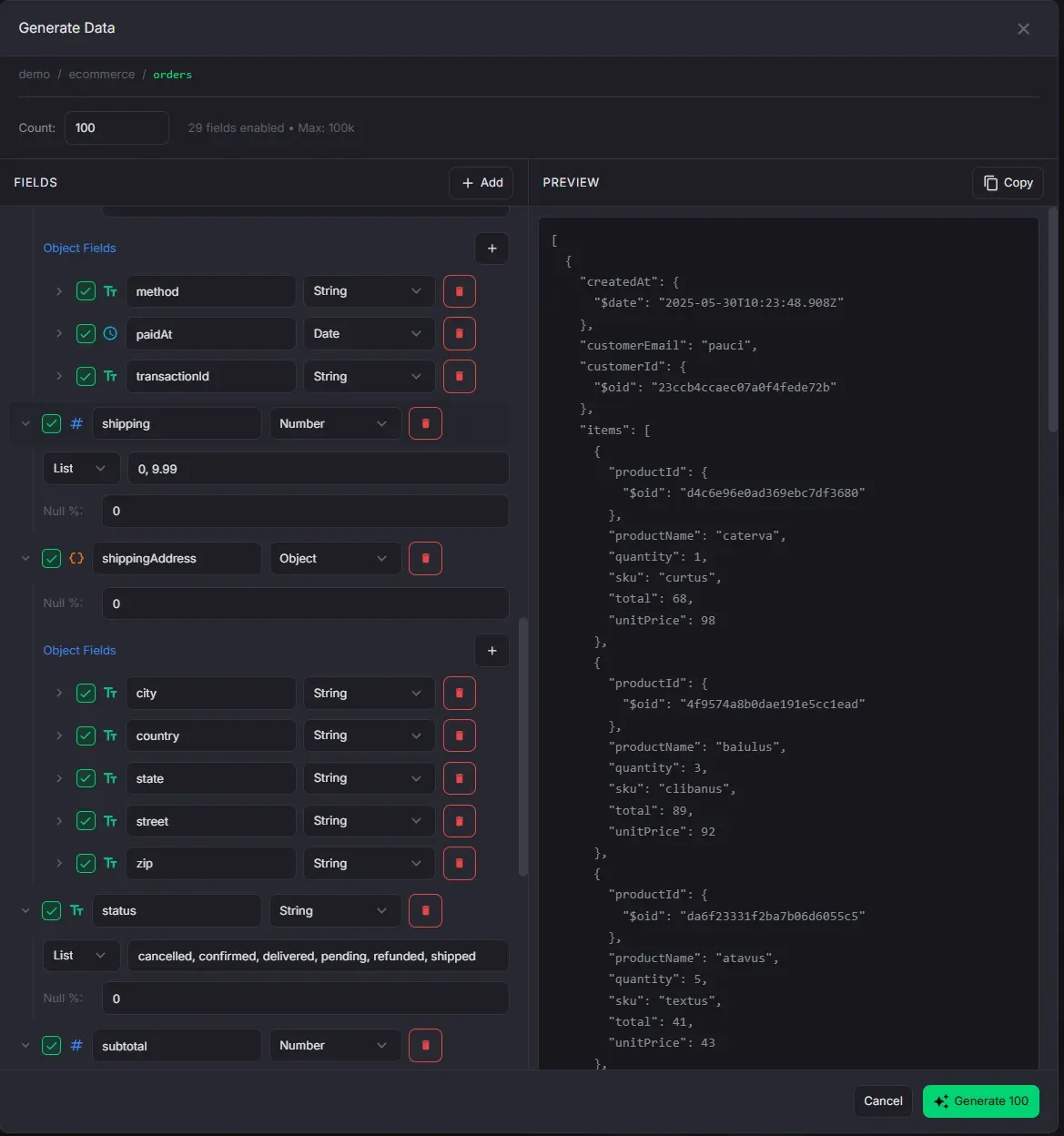
Data Generation
Generate synthetic documents with Faker.js for testing and development.
- 100+ Faker.js providers across 16 categories (names, emails, addresses, commerce, etc.)
- Value modes: Faker, Literal, List, and Range with per-field null probability
- Full support for nested objects and configurable arrays
- Preview a sample document before generating
- Generate up to 100,000 documents at once
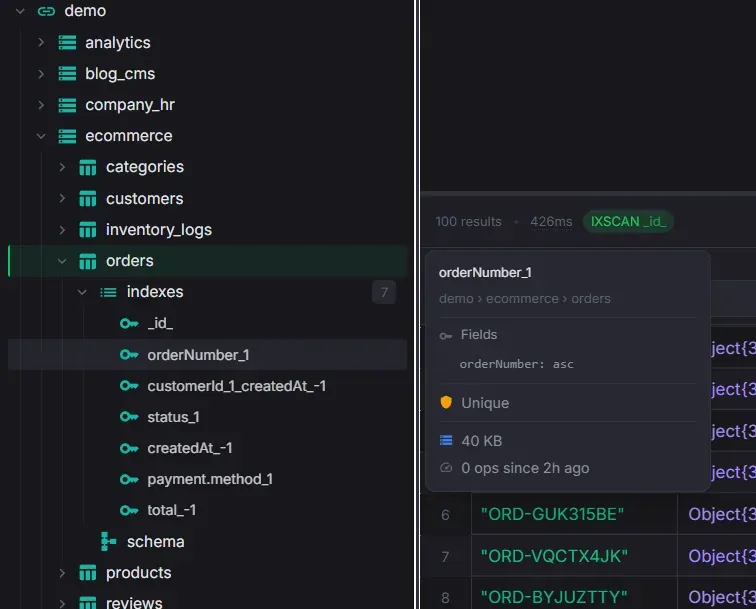
Index Management
Create, inspect, and manage indexes with usage statistics and smart suggestions.
- Create multi-field compound indexes with reorder, ascending/descending toggle, and live preview
- Unique, sparse, background, and partial filter options
- Visual indicators for unique, sparse, partial, and TTL indexes
- Per-index size and usage count from $indexStats, color-coded by activity
- Smart index suggestions from the Explain View — pre-filled Create Index modal with one click
- Drop and rebuild individual indexes
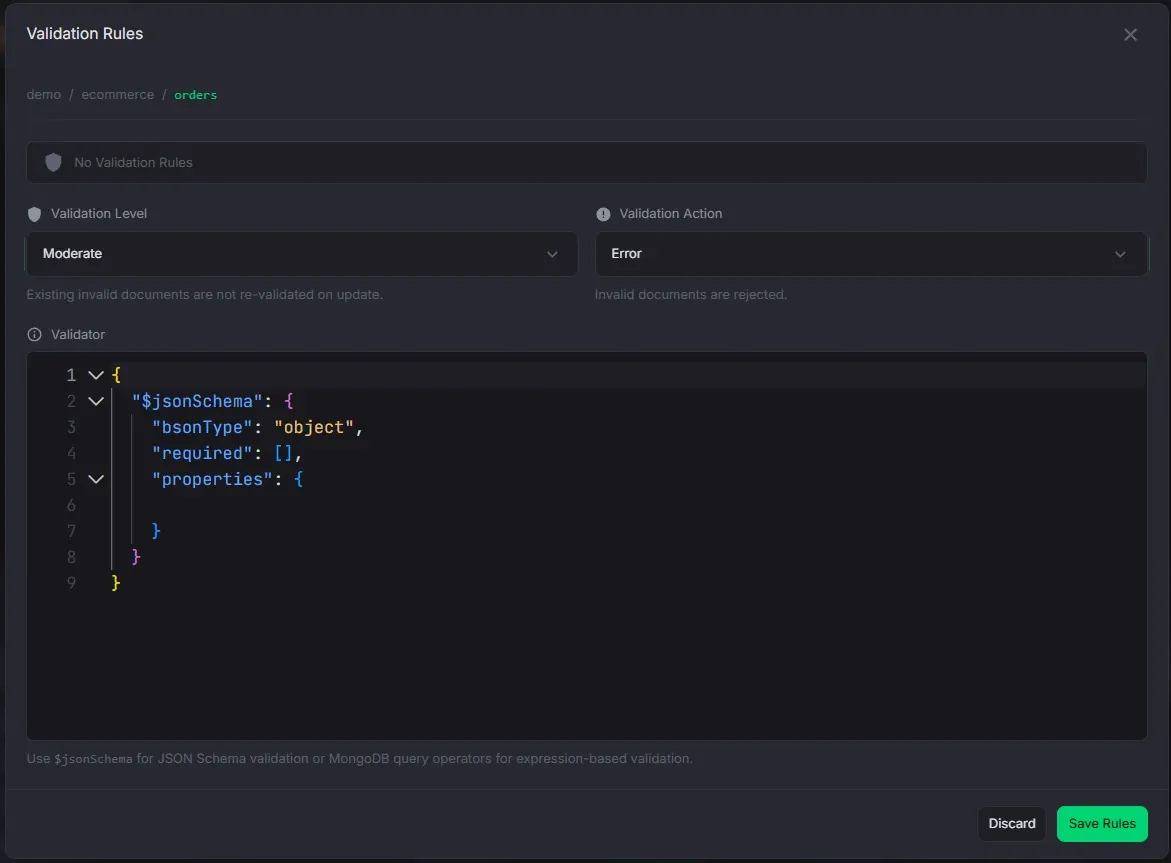
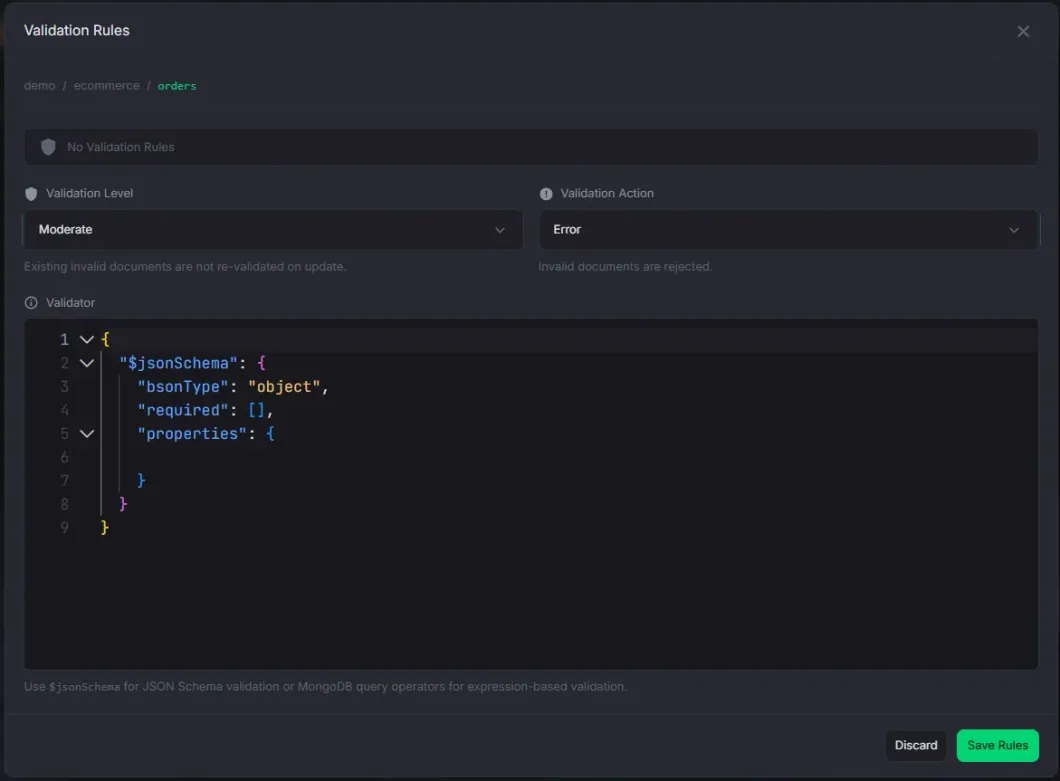
Validation Rules
View, create, and edit MongoDB collection validators.
- Monaco JSON editor for the validator expression
- $jsonSchema template insertion with one click
- Validation level (off, moderate, strict) and action (error, warn) controls
- Validation node in the sidebar tree with level/action badges
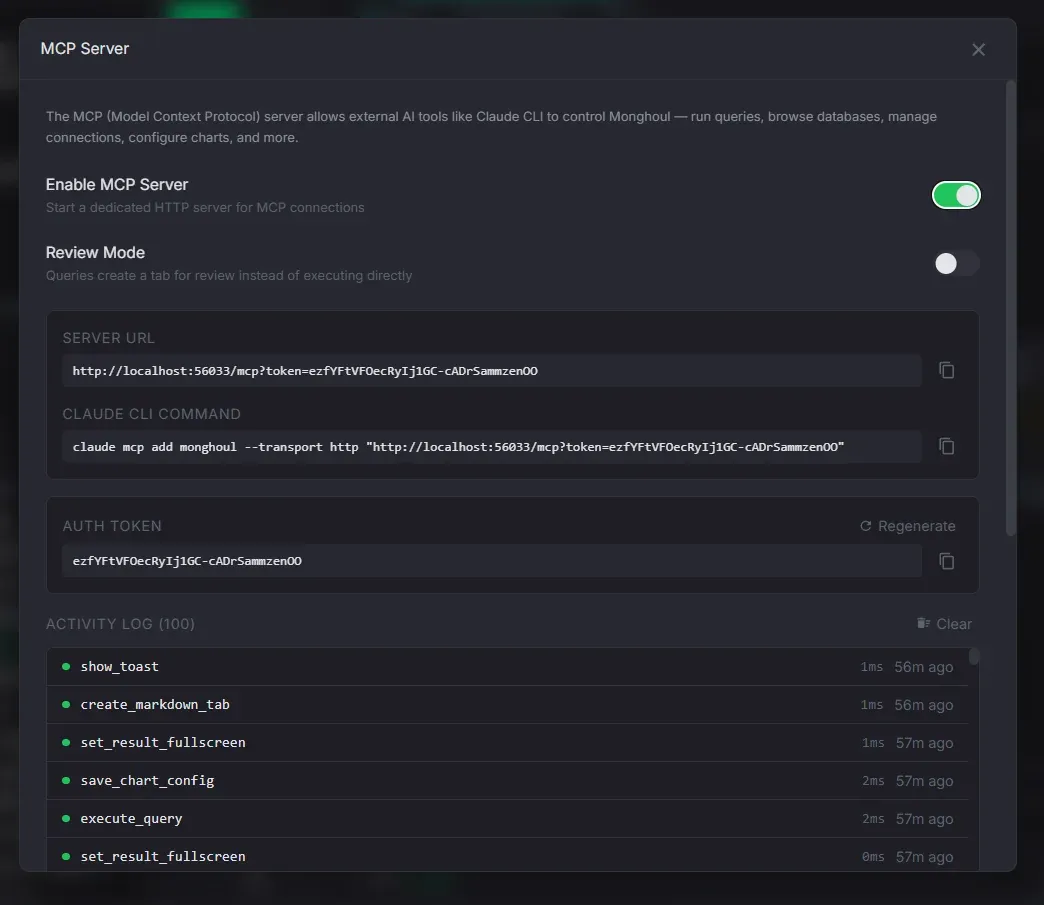
MCP Server (AI Tools)
70+ Model Context Protocol tools for AI assistant integration.
- Connection, database, collection, and query management tools
- Schema analysis, index management, and data export/import
- Tab, panel, and window management for workspace automation
- Token authentication with regeneration
- Review mode — AI queries require manual approval before execution
- Access log with method, params, status, and timestamp
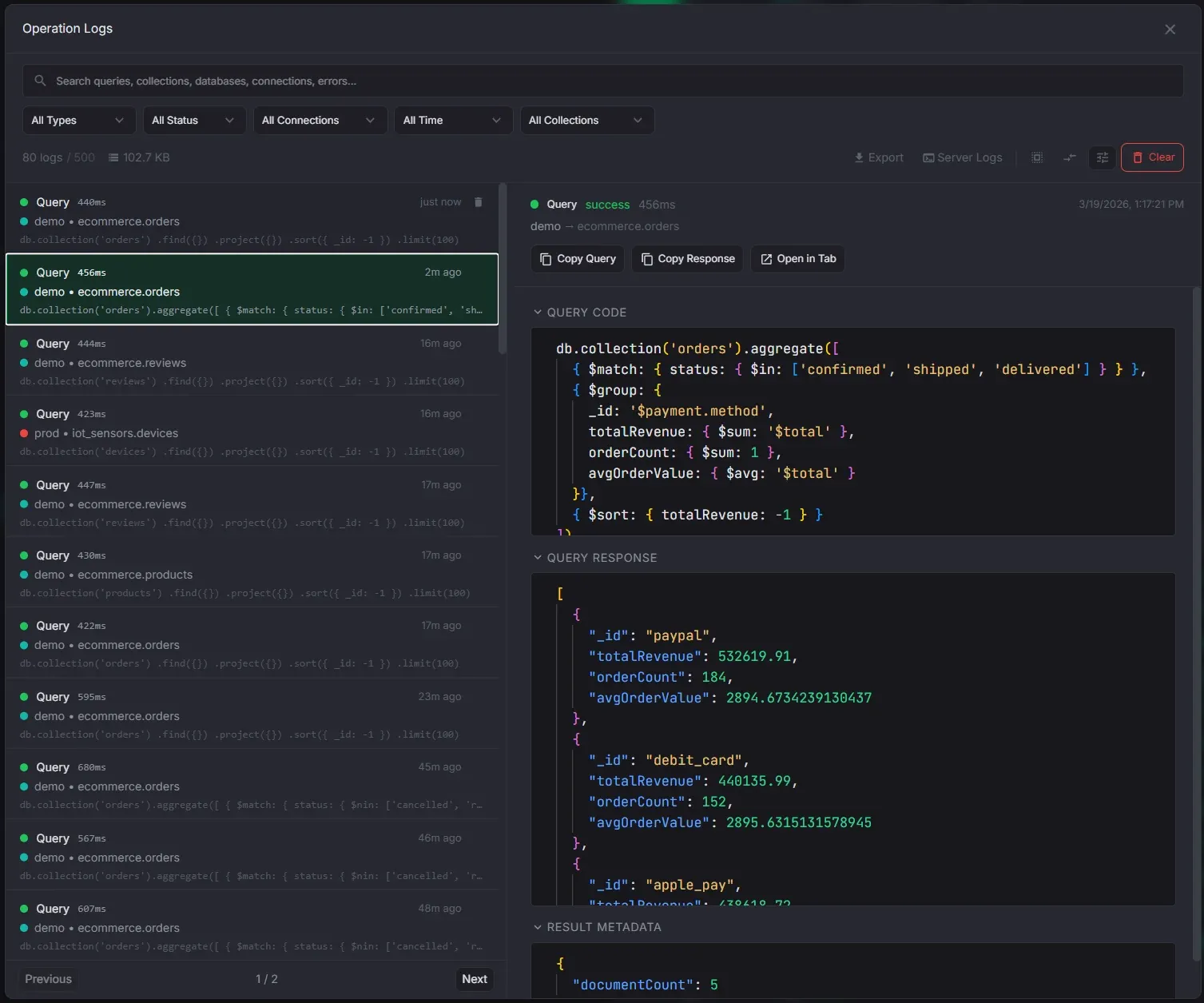
Operation Logs
Full audit trail of every operation, doubling as a past queries search tool.
- Server-side full-text search across query code, collections, connections, and errors
- Filters: operation type, status, connection, time range, collection
- Query diff mode — compare any two queries side by side in Monaco DiffEditor
- Configurable retention (100 to unlimited) and response storage (none, stripped, full)
- Export operation logs or server logs for debugging
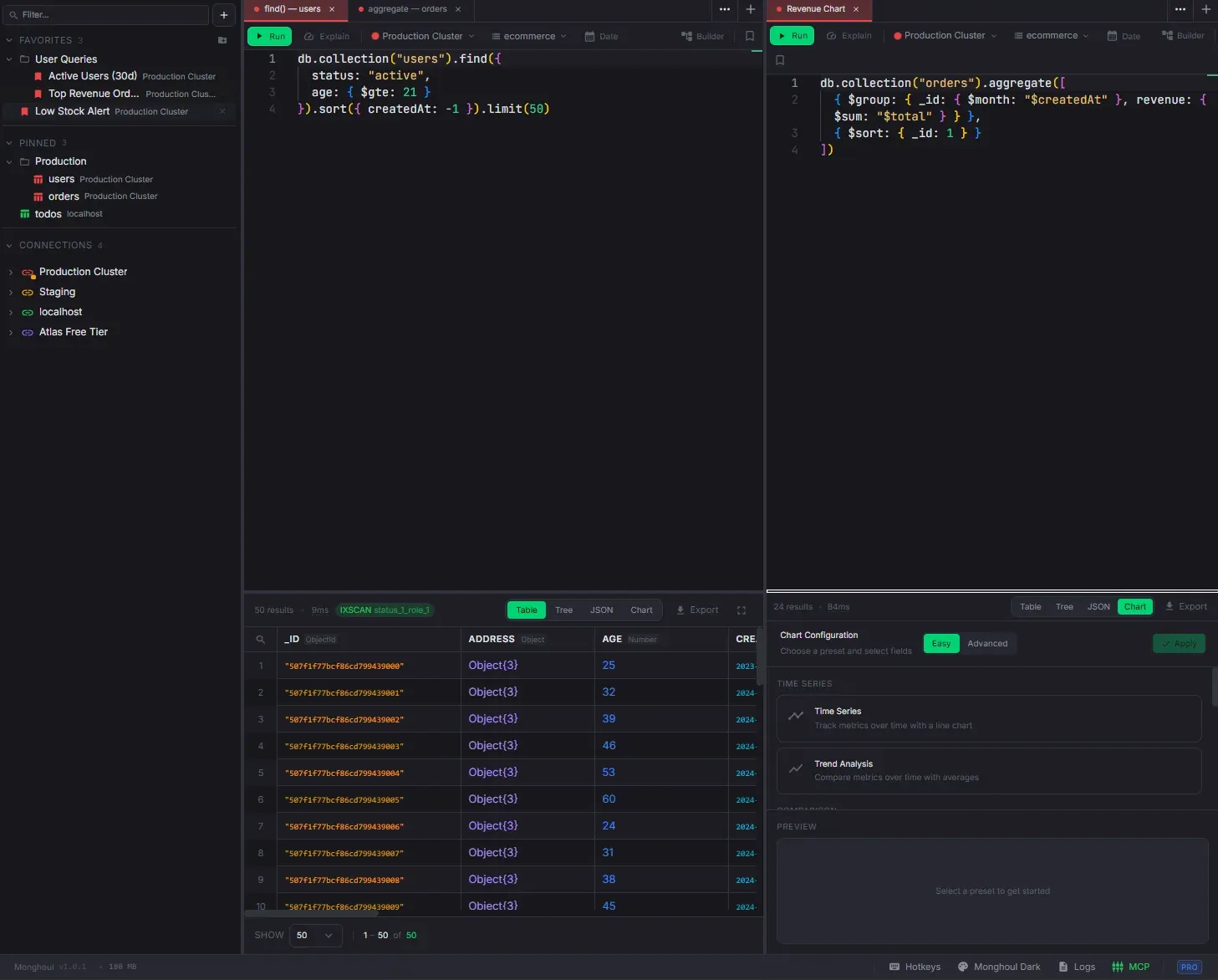
Workspace & Tabs
Multi-panel layout, detached windows, and a command palette.
- Query, Markdown, JSON Viewer, and Cluster Monitor tab types
- Drag-and-drop tab reordering within and across panels
- Split panels horizontally or vertically with nested splits
- Detach tabs into floating windows with position persistence
- Command palette (Ctrl+K) with fuzzy search across everything
Document Diff
Compare any two documents side by side with line-level change highlighting.
- Monaco DiffEditor with JSON formatting and syntax highlighting
- Document selectors to pick any two from the current selection
- Swap button to quickly flip left and right sides
- Configurable label field for document dropdown display
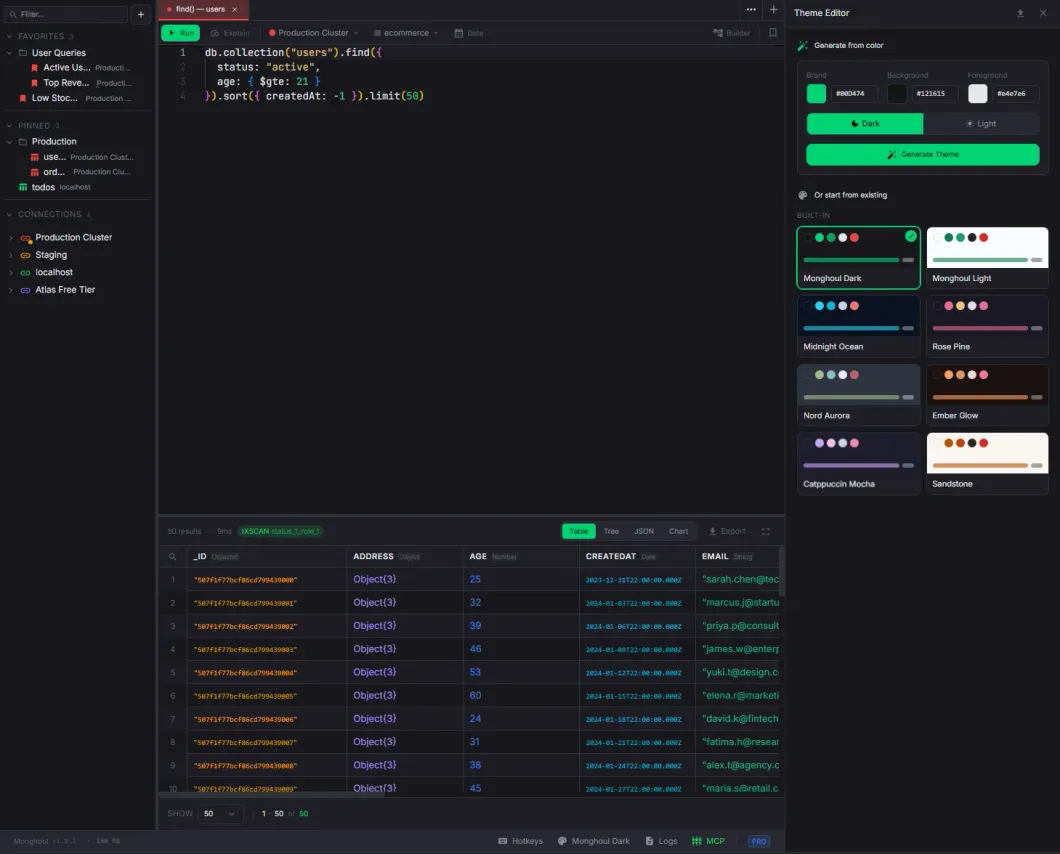
Custom Themes
10 built-in themes and a full theme editor with 3-color generation.
- Monghoul Dark (default), Monghoul Light, Midnight Ocean, Rosé Pine, Nord Aurora, Ember Glow, Catppuccin Mocha, Sandstone, Ink, Paper
- 3-color generation: pick Brand, Background, and Foreground to derive 40+ semantic colors
- 21 MongoDB type-specific colors for data type badges
- Monaco editor theming with custom token rules
- Import/export themes as JSON files
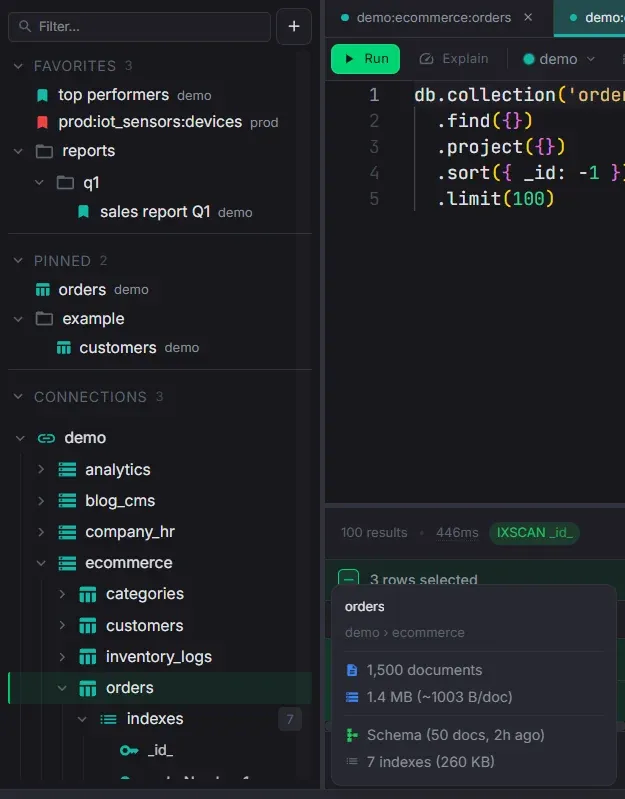
Sidebar Organization
Folders, pinned collections, favorites, and drag-to-reorder across all sections.
- Create folders and nested subfolders in Connections, Pinned, and Favorites
- Drag items into folders or back to root with VSCode-style three-zone drop detection
- Collapse/expand folders with item count badges — state persists across sessions
- Pinned collections open a pre-formatted find query on double-click
- Customizable code snippets — edit templates, reorder, and set the default query
- Favorite queries saved with Ctrl+S — preserves chart config, view type, and page size
- Hover preview cards with collection stats and context menus
Complete Feature Reference
Every capability in Monghoul, grouped by area.
Connections & Security
- 8 authentication methods: No Auth, Username/Password, SCRAM-SHA-1, SCRAM-SHA-256, X.509 (certificate + passphrase), LDAP, Kerberos (service name + credential cache), AWS IAM (access key, secret, session token) — all with configurable auth source database
- SSL/TLS with custom CA certificates, client certificates, and an option to allow invalid certificates for self-signed setups
- SSH tunneling with password or private key file — automatic tunnel lifecycle management and port forwarding
- Connect via URI string or form-based editor — pasting a URI auto-fills all fields (host, port, credentials, auth, SSL, replica set, read preference), and switching modes keeps everything in sync
- Direct or Replica Set connection types with read preference selection: primary, primaryPreferred, secondary, secondaryPreferred, nearest
- Persistent pooled connections with cancellable queries — abort sends killOp to the server
- Per-connection result auto-cap — configurable maximum documents fetched per query (default 1,000); queries with explicit .limit() bypass the cap
- Auto-explain toggle per connection — automatically collects execution plan stats after each query; enabled by default, can be disabled for connections where overhead is unwanted
- Database and collection filtering with ignore (hide listed) or allow (show only listed) modes — system databases filtered by default
- Write protection with database and collection scope — regex-based detection of 25+ destructive operations (deleteMany, drop, $out, $merge, bulkWrite, etc.) with a confirmation dialog before execution; shield badge on protected items in the sidebar
- Connection health check before saving — can be cancelled mid-flight
- Connection color coding with 12 presets and a custom color picker — color propagates to tabs and sidebar entries
- Auto-generated connection names from host, port, and database with deduplication
- Configurable connection timeout (default 30 seconds)
Sidebar & Navigation
- Hierarchical tree: Connections > Databases > Collections > Indexes, Schema, Validation — with lazy-loading expansion
- Instant search bar always visible above all sections — matching connections and databases auto-expand to reveal matched collections, collapse back when filter is cleared
- Hover preview cards on connections showing host (credentials masked), database/collection counts, data size, topology, auth method, transport security, non-default settings, and write-protection scope
- Hover preview cards on collections showing document count, data size (with average per doc), schema status, index count and total size, validator info, and write-protection status
- Hover preview cards on databases showing collection count, data sizes, and index totals
- Hover preview cards on indexes showing key fields with direction, flags, size, and access operations
- Hover preview cards on schema nodes showing sample size, field count with type breakdown, required vs optional, and enum fields
- Right-click context menus at every level — connections (create database, refresh, monitor, import, edit, delete), databases (create collection, refresh, import, export, calculate size, rename, drop), collections (open, snippets submenu, import/export, generate data, pin, schema, indexes, validation, rename, clear, drop)
- Customizable snippets submenu — add, remove, drag-to-reorder, and edit query templates with a Monaco editor; auto-save with Prettier formatting; star a snippet to set it as the default double-click query; restore built-in defaults at any time
- Pinned collections in a dedicated section — double-click to open a pre-formatted find query; same context menu and hover preview as regular collections
- Favorite queries saved with Ctrl+S — preserves code, view type, chart config, pinned columns, page size, and read preference; synced on re-save; searchable via Command Palette; outlined/filled bookmark icons and sync button in the toolbar
- Folder system for all three sections with nested subfolders to any depth — create, rename, delete folders; drag items in/out; collapse with item count badges; search flattens folder grouping
- Drag-to-reorder connections, favorites, and folders with VSCode-style whole-row dragging and three-zone drop detection
- Drag a collection or database onto another connection to open a prefilled copy modal
- Sticky scroll headers for connections and databases while scrolling, with drop shadow when content scrolls beneath
- Resizable sidebar (5–80%) with width persisted across sessions; toggle with Ctrl+B / Cmd+B
Command Palette
- Open with Ctrl+K / Cmd+K from anywhere in the app
- Fuzzy search across connections, databases, collections, favorite queries (with descriptions), and pinned collections
- Selecting a result navigates to and expands the corresponding tree node, or opens the favorite in a new tab
Query Editor & Autocomplete
- Full Monaco (VS Code) editor with JavaScript syntax highlighting, configurable font size, and theme-aware styling
- Field path suggestions with type annotations (String, Number, ObjectId, Date, etc.) derived from schema analysis — progressive nested field disclosure shows only the current nesting level
- Pipeline-accumulated fields — $addFields, $group, $project, $lookup output automatically feeds autocomplete in subsequent stages; reshaping stages replace the field list; removal stages filter out dropped fields; disabled stages are skipped; $lookup resolves the foreign collection's schema for nested field paths (e.g. customer.name, customer.address.city), with pipeline-form $lookup narrowing output to the sub-pipeline result
- All MongoDB query operators ($eq, $gt, $in, $regex, $exists, $type, etc.), update operators ($set, $push, $inc, $addToSet, etc.), and 40+ collection methods with inline documentation
- All aggregation stages, accumulators ($sum, $avg, $push, $first, $accumulator, etc.), and 50+ expression operators ($dateAdd, $getField, $function, etc.)
- Stage-aware string completions — $lookup.from suggests collection names, localField suggests current fields (ObjectId-prioritized), foreignField suggests foreign collection fields, $unwind suggests array fields, $group._id suggests field references; $replaceRoot/$replaceWith resolves field references to nested paths; $facet branches expose sub-pipeline output fields; $unionWith merges the other collection's schema
- Index-aware field prioritization — indexed fields boosted in $sort and $match with "(indexed)" label; compound index hints suggest the next field in sequence with correct direction
- Enum value suggestions from schema analysis — works inside $in, $nin, $eq, $ne, and direct field comparisons
- Type-aware operator suggestions — $regex prioritized for strings, $gt/$lt for numbers and dates, $size/$elemMatch for arrays
- $expr context switching — inside $expr in $match, autocomplete switches from query operators to aggregation expressions
- System variables ($$ROOT, $$NOW, $$REMOVE, etc.) and user-defined variable scoping from $let, $lookup.let, $map/$filter as:, and $reduce
- BSON constructors with snippet placeholders: ObjectId(), NumberLong(), NumberDecimal(), UUID(), BinData(), Timestamp(), RegExp(), MaxKey(), MinKey()
- $jsonSchema keyword suggestions inside validator expressions
- Date helper — calendar with single/range mode, timezone-aware quick presets, curated timezone selector, auto-generated $gte/$lte filter output
- JavaScript sandbox with db, ObjectId, id() shorthand, ISODate, NumberLong/Int/Decimal, Faker.js, Lodash, Luxon, and Day.js — single expressions auto-return, multi-line scripts use return
- Code formatting with Prettier — Shift+Alt+F, Ctrl+S, or floating button; auto-formats generated code on tab creation; method chains broken onto separate lines for readability
- Run with Ctrl+Enter / Cmd+Enter / Cmd+R, Explain button, Stop button, elapsed timer, connection/database/read preference selectors
- Responsive layout — toolbar and line numbers adapt to narrow panels
Aggregation Builder
- Visual pipeline builder with all MongoDB aggregation operators ($match, $group, $project, $lookup, $unwind, $sort, $addFields, $set, $replaceRoot, $bucket, $facet, $graphLookup, $unionWith, $setWindowFields, $densify, $fill, $search, $vectorSearch, and more) in a categorized, searchable dropdown
- Server version gating — stages requiring a newer MongoDB version than the connected server are shown as disabled with a version badge (e.g., "5.0+"); raw editor remains ungated
- Color-coded stage badges grouped by category: Filter & Sort, Transform, Group & Aggregate, Join & Combine, Output, Other
- New stages start with appropriate template bodies; changing the operator auto-updates the template if unmodified
- Quick-start templates for empty pipelines: Filter & Sort, Group & Count, Join Collections, Reshape Fields
- Drag-and-drop reordering with grip handles, plus Move Up / Move Down buttons for keyboard-friendly reordering
- Per-stage controls on hover: enable/disable (excluded from execution), collapse/expand, duplicate, delete, and Run To Here to see intermediate results
- Stage connectors between every pair with an always-visible "+" button to insert at any position
- Full context-aware autocomplete per stage editor — $match gets query operators, $group gets accumulators, $project gets expressions, each with pipeline-accumulated fields from earlier stages
- $lookup form helper with dropdowns for From collection, Local/Foreign field (with ObjectId prioritization), and As output name — changes sync bidirectionally with the stage body
- Explain plan button — runs explain on the current pipeline without modifying code, displays in Explain View
- Stage preview with configurable safety limit (auto-appends $limit: 20), auto-preview mode (re-runs 2 seconds after each edit), and inline tree view below each stage card
- Destructive stage protection — $out and $merge flagged with warning icon; on write-protected connections, require confirmation before execution
- Stage search when 4+ stages are present — filter by operator name, description, or body content; non-matching stages are dimmed, not hidden
- Undo/redo (Ctrl+Z / Ctrl+Shift+Z) tracking structural changes with up to 50 history entries
- Bidirectional code sync — the visual builder generates executable code viewable in a togglable side panel; existing aggregation code can be parsed back into pipeline stages
- Full builder state persisted per tab — stages, operators, bodies, enabled/disabled, collapsed/expanded, collection name, and editor mode
Result Viewer
- Six view modes: Tree (hierarchical JSON), Table (spreadsheet), Raw (formatted JSON string), Visual (write operation results), Explain (execution plan), and Chart — active mode persisted per tab; set a default view via right-click
- Fullscreen modes: Tab (hides editor, results fill tab) or Window (results fill entire app) — persisted per tab, exit with Escape; collapsible result panel for editor-focused workflows
- Resizable editor/result split with ratio persisted per tab
- Tree view: expand/collapse with keyboard, type badges, resizable columns, inline previews, sticky headers, and instant cross-page search
- Table view: column sorting, resize, pinning, reorder — persistent per tab; inline editing, multi-select, and instant search with cell-level highlighting
- Table search: Ctrl+F opens search bar with cell-level match highlighting — matched cells get tinted background; next/prev navigates to specific cells and auto-scrolls horizontally; works across pages with automatic page jumping
- Table multi-select: checkbox on row hover, Shift+click for range, Ctrl+click to toggle, Ctrl+A for all; floating selection bar with Copy, Delete, Show Diff, and Cancel actions
- Hover preview for complex values (Object/Array) — floating popover with formatted JSON after 400ms hover
- Expand complex values inline below the row with nested tree, breadcrumb path, editable leaf values, and resizable panel
- Result cap with cursor pagination — configurable per connection (default 1,000); Load 5K / 10K / All buttons when results are capped; explicit .limit() bypasses the cap
- Auto-explain badge on every query result — green IXSCAN (with index name) or red COLLSCAN pill; hover popover with full plan details
- Advanced Explain View: performance grade, summary metrics, execution pipeline, aggregation pipeline with structured stage details, data flow funnel, index suggestions with one-click creation
- Inline editing: double-click any value to edit strings, numbers, booleans, dates, ObjectIds, null; type selector dropdown with auto-conversion; enum combobox suggests schema-detected values; write protection confirmation on protected connections; optimistic updates with rollback on failure
- Right-click context menu: Edit Value, Filter by Value, Unset Field (single or all docs), Clone Document, Copy Value/Key/Path/Column Name/Document, Edit Document, Delete Document, Insert Document
- Document diff: select 2+ rows, click Show Diff to compare side by side with line-level change highlighting; document selectors, swap button, configurable label field
- Export results directly: JSON (Extended JSON), CSV (with array flattening), Excel (.xlsx)
- Pagination: first/prev/next/last navigation, editable page number (click to type), page size selector (10/25/50/100/200), total count always visible
Charts & Visualization
- 8 chart types: Bar, Horizontal Bar, Line, Area, Pie, Scatter, Stacked Bar, and Stacked Area
- Easy Mode with 7 built-in presets (Time Series, Category Breakdown, Distribution, Multi-Series, Trend Analysis, Correlation, Stacked) with guided field mapping
- Advanced Mode with manual X/Y axis fields, multiple Y-axis series, aggregation methods (sum, count, avg, min, max), grouping, scatter trend lines, and full chart options
- Date aggregation grouping by hour, day, week, month, quarter, or year with timezone support
- Dual Y-axis (left and right) for comparing values at different scales
- Customizable title, legend, labels, sort order, data limit, series colors, stacking, and filters
- Chart theming follows the active app theme automatically
- Fullscreen mode (Tab and Window) consistent with all other view types
- Export as high-resolution PNG (4x pixel ratio) with theme-aware background
- Chart configurations saved per tab and persisted with the workspace
Tabs & Workspace
- Four tab types: Query (editor + results), Markdown (edit/preview toggle with auto-save), JSON Viewer (read-only tree with syntax highlighting), Cluster Monitor (real-time metrics)
- Drag-and-drop tab reordering within a panel and across panels
- Tab context menu: Execute/Stop Query, Clone Tab, Reveal in Sidebar, Rename, Split Right/Down, Move to Panel, Rename Panel, Open in New Window, Close Tab, Close Other Tabs
- Inline rename by double-clicking the tab title; connection color indicator on each tab; middle-click to close
- Tab restore with Ctrl+Shift+T / Cmd+Shift+T — reopen the last closed tab with full state (code, results, view mode)
- Tab shortcuts: Ctrl+W close, Ctrl+Shift+T restore, Ctrl+D clone, Ctrl+1–9 switch by index, Ctrl+Tab / Ctrl+Shift+Tab next/prev tab, Cmd+Option+Arrow next/prev panel
- Multi-panel layout: split horizontally or vertically with nested splits; resizable dividers; panel sizes persisted; custom panel names via context menu
- Detach any tab into a floating window — reattach back; window position and size persisted across sessions
- Main window bounds (size, position, maximized state) saved and restored on launch
Import & Export
- Import from JSON (array, EJSON, gzip), NDJSON (newline-delimited), CSV/TSV (configurable delimiter, header detection, per-column type mapping), and Excel (.xlsx/.xls)
- Write strategies: Insert (append), Upsert (insert or update by _id), Drop & Insert (drop collection first)
- Stop on error or skip and continue; auto type inference converts strings to numbers, booleans, and null
- Export to JSON (EJSON canonical or relaxed, array or NDJSON, pretty-print, gzip), CSV (custom delimiter, array flattening), Excel (.xlsx with EJSON-aware serialization)
- MongoDB collection copy: export directly to another database or connection (cross-instance); write mode selection (Insert, Upsert, Insert Only); optional index replication preserving unique, sparse, TTL, partial filter, and collation properties
- Document limit and MongoDB filter (JSON query) for selective exports
- Database-level import and export — process all collections in a database at once
- Background processing with real-time progress bars, percentage indicators, and cancellation from the footer task list
Schema Analysis
- Configurable sample size with input field and quick presets (100, 500, 1K, 5K, 10K documents); sampling via MongoDB $sample aggregation
- Real-time progress streaming during analysis with cancellation support
- Hierarchical field tree showing full document structure including nested objects and arrays
- Color-coded type badges for every detected type (String, Number, Boolean, ObjectId, Date, Array, Object, Null, and all BSON types); arrays display element types (e.g., array<number|string>)
- Per-field occurrence percentage bar showing how often each field appears in the sample; fields present in 100% marked "required", others show percentage
- Stats summary: total fields, required count, optional count, enum count, sample size
- Automatic enum detection with configurable thresholds — max distinct values (default 20), max ratio (default 0.5), optional numeric enum support; detected values displayed as chips below the field
- Manual enum editing — click "+ add" to type values, hover chips to remove; edits persist immediately
- Enum values drive autocomplete suggestions in the query editor — works inside $in, $nin, $eq, $ne, and direct comparisons with field-scoped context
- Field search to filter the tree by name with auto-expanding parent nodes
- Auto schema generation — opening a tab for a collection without a schema triggers background analysis; also detects collections referenced in aggregation stages ($lookup.from, $graphLookup.from, $unionWith, $merge.into, $out) and auto-analyzes them for seamless foreign-collection autocomplete
- Schema banner — if the collection has no schema, a subtle prompt at the bottom of the editor offers one-click generation; disappears automatically when the schema is ready
- Copy full schema as JSON to clipboard
- Results cached in the database and persisted across sessions; relative timestamp shows when last analyzed
Data Generation
- Visual schema builder for configuring generated document structure
- Supported types: String, Number, Boolean, Date, ObjectId, Object (nested), Array (configurable min/max length with element type)
- 100+ Faker.js providers across 16 categories: names, emails, addresses, phone numbers, companies, commerce, finance, lorem, dates, database IDs, images, vehicles, music, system files, and more
- Four value modes per field: Faker (provider-based), Literal (static value), List (random from provided values), Range (numeric min/max with decimal places)
- Per-field null probability (0–100%) for realistic sparse data
- Full support for nested object schemas and arrays with configurable element configuration
- Preview a sample document before generating to verify the schema
- Generate up to 100,000 documents at once with background progress tracking
Index Management
- Create multi-field compound indexes with reorder buttons, ascending/descending toggle, live createIndex() preview, and optional custom name
- Index options: Unique constraint, Sparse index, Background build, Partial filter expression (JSON), TTL expiry
- Pre-fill from Explain View — index suggestions open the Create Index modal with fields already populated following the ESR rule
- Per-index size and usage statistics from $indexStats — total operations color-coded green (active) or muted (unused)
- Visual indicators for unique, sparse, partial filter, and TTL indexes with hover tooltips showing expiry duration and tracking start date
- View index details including key fields, options, and size
- Drop and rebuild individual indexes; sync indexes from the live server
- Indexes folder hover preview showing total index size, total access operations, unique/sparse counts, and a list of indexes with sizes
Validation Rules
- Full Monaco JSON editor for the validator expression with syntax highlighting
- One-click $jsonSchema template insertion to get started quickly
- Validation level control: Off (disabled), Moderate (existing documents exempt), Strict (all documents validated)
- Validation action control: Error (reject invalid documents) or Warn (allow with warning)
- Sidebar tree node for collections with active validators — shows level and action in a badge; right-click for Edit or Remove validation
- Sync validation rules from the live server to see changes made outside the app
Cluster Monitoring
- 10 metric cards: active connections, operations per second (insert/query/update/delete/command), resident memory, WiredTiger cache usage, network bytes in/out, global lock queue, open cursors, and replica set status
- Sparkline trend charts with hover tooltips showing exact values (last 30 data points)
- Server info panel: MongoDB version, uptime, storage engine, max connections, host, and replica set role
- Slow query analysis — live table of active operations with duration filters (100ms to 30s+), COLLSCAN badges, and one-click kill operation
- Database profiler — enable/disable per database, filter by operation type and duration, collection-level ranking, and export profiler data
- Configurable poll interval from 1 second to 60 seconds with pause/resume
- Metrics error handling — graceful degradation when specific metrics are unavailable
Operation Logs
- Complete audit trail of every query, mutation, aggregation, and background operation
- Server-side full-text search across query code, collection names, connection names, and error messages
- Filters: operation type (find, aggregate, insert, update, delete, etc.), status (success, error, cancelled), connection, time range, and collection
- Query diff mode — select any two log entries and compare their queries side by side in a Monaco DiffEditor with line-level change highlighting
- Syntax-highlighted code preview with expandable response data for each log entry
- Configurable retention: keep 100 to unlimited entries; response storage modes: none (code only), stripped (metadata without full response), or full (complete response data)
- Lazy-loaded responses — full response data fetched on demand only when the detail panel is opened
- Storage size tracking with warning when logs exceed configurable thresholds
- Multi-select with bulk delete; export operation logs or raw server logs
- Resizable list/detail split layout with pagination
MCP Server (AI Integration)
- 70+ Model Context Protocol tools for AI assistants — works with Claude, Cursor, Windsurf, and any MCP-compatible client
- Connection management: list, test, connect, disconnect, and inspect connections
- Database operations: list and sync databases and collections; destructive operations (create/drop) available via execute_query
- Query execution: run find, aggregate, and arbitrary JavaScript queries; schema-aware results
- Schema tools: analyze schemas, list indexes, create indexes, view validation rules
- Import/export: export collections (JSON, CSV), import data, copy collections between connections
- Workspace automation: manage tabs, panels, windows, sidebar navigation, and pinned collections
- Token-based authentication with regeneration for security
- Review mode — when enabled, AI-generated queries are queued for manual approval before execution; approve or reject from the MCP settings panel
- Access log tracking every tool call with method name, parameters, status, duration, and timestamp
- Real-time UI sync — changes made by AI tools are immediately reflected in the app interface
Themes & Appearance
- 10 built-in themes: Monghoul Dark (default), Monghoul Light, Midnight Ocean, Rosé Pine, Nord Aurora, Ember Glow, Catppuccin Mocha, Sandstone, Ink, Paper
- Full theme editor with 3-color generation — pick Brand, Background, and Foreground seed colors to derive 40+ semantic tokens covering backgrounds, borders, text, accents, and status colors
- 21 MongoDB type-specific colors for data type badges (ObjectId, String, Number, Boolean, Date, Array, Object, Null, etc.) — customizable per theme
- Monaco editor theming with custom token rules that follow the active theme
- Import and export themes as JSON files to share with others
- Theme changes apply instantly across the entire app without restart
Keyboard Shortcuts
- Ctrl+Enter / Cmd+Enter — run query or Cmd+R
- Ctrl+K / Cmd+K — open command palette
- Ctrl+S / Cmd+S — format code; Ctrl+Shift+S — save to favorites (or sync if already saved)
- Ctrl+B / Cmd+B — toggle sidebar visibility
- Ctrl+T / Cmd+T — new query tab
- Ctrl+W / Cmd+W — close active tab
- Ctrl+Shift+T / Cmd+Shift+T — restore last closed tab
- Ctrl+D / Cmd+D — clone current tab
- Ctrl+1–9 / Cmd+1–9 — switch to tab by position
- Ctrl+Tab / Ctrl+Shift+Tab — next/previous tab
- Cmd+Option+Right / Cmd+Option+Left — next/previous panel
- Ctrl+Plus / Ctrl+Minus — zoom in/out; Ctrl+0 to reset
- Ctrl+F / Cmd+F — search within results (Tree and Table views)
- Escape — close modals, exit fullscreen, clear search
- Arrow keys — navigate Tree View nodes and Table View cells; Tab/Shift+Tab advance through table cells
Extended JSON (EJSON)
- Full EJSON support for all MongoDB types: ObjectId, Date, Long (Int64), Int32, Decimal128, UUID, Binary, Regex, Timestamp, MinKey, MaxKey, DBRef
- Automatic type detection with color-coded badges displayed consistently throughout Tree View, Table View, inline editors, and export output
- Round-trip fidelity — EJSON types are preserved through editing, import, export, and copy operations without silent type coercion
- Shell-compatible constructors in the query editor: ObjectId(), ISODate(), NumberLong(), NumberDecimal(), UUID(), and more
Database & Collection Operations
- Create and drop databases from the sidebar context menu
- Create, rename, clear (remove all documents), and drop collections
- Per-database size statistics: collection count, data size, storage size, index size
- Per-collection size statistics: document count, data size (with average per document), storage size, index count and size
- Background task system for long-running operations with progress bars, percentage indicators, and cancellation — visible in the footer task list
Licensing & Trial
- 14-day free trial — full Pro access, no payment required
- Freemium model: Free tier (8 connections, limited features) and Pro tier (unlimited everything)
- Activate on up to 3 devices per license key
- Lifetime licenses include 2 years of updates; subscriptions include updates for the duration
Auto Updates & Footer
- Automatic update check on app launch with in-app banner showing new version
- One-click install and restart; release notes tab opened after updating
- Footer status bar with background task progress and quick access buttons
- Quick access to theme selector, MCP settings, operation logs, and license status from the footer
- Update expiry handling — shows warning if current build is no longer eligible for updates